AI Product Experience Teardown

Feishu Aily Experience Teardown: AI Boundaries, User Control, and Human Fallback

A product experience teardown of Feishu Aily, focusing on how enterprise AI maintains user control and service continuity when AI reaches its limits.

AI Product Portfolio Kevin Chang

Office Agent User Control Failure Fallback Human Handoff

00 / Background

Human-in-the-loop AI service is becoming a necessary boundary for office AI

The 2026 Interim Measures for the Administration of Anthropomorphic Interactive AI Services states in Article 13 that when a system detects users facing, or having already suffered, major property loss, clear threats to life safety or physical health, or other extreme situations, it should take necessary intervention measures, provide appropriate assistance, and contact guardians or emergency contacts in time. Doubao and Qianwen also took their intelligent-agent services offline on July 15 for targeted adjustments, which shows that compliance remains a significant challenge even for major AI companies.

Doubao avatar and Qianwen logo evidence visual

Doubao and Qianwen agent services will go offline on July 15, 2026.

Background evidence: Doubao and Qianwen adjusted their agent services, showing that office AI and agent products are simultaneously facing capability, compliance, and human-fallback boundaries.

Under this regulatory direction, appropriate assistance also includes timely human intervention. Future AI compliance design cannot assume that AI works entirely independently from humans; in necessary situations, humans need to intervene. For this series of issues, product design should support a clear transition from AI service to human service, while preserving user interests and complying with relevant laws and regulations.

At the current stage, AI assistants and AI customer-service systems still have obvious functional limits. When users are not satisfied with an AI answer, or when AI determines that a request has exceeded its capability boundary, human intervention becomes necessary. This situation is common, such as Feishu AI customer service escalating to a human agent or e-commerce AI customer service transferring to human support. Because of service cost and AI's limited empathy, users will eventually hit the boundary of AI during everyday use. As a product manager, the key question is how that boundary should be converted, softened, or even made less visible from the user's perspective.

01 / Understanding Feishu Aily

Aily is not a single chat entry, but an office AI Agent embedded in the collaboration ecosystem

According to Feishu's help center, Aily is an intelligent partner that is "deeply integrated with Feishu and works as the user's intelligent office assistant." Its capabilities cover message processing, document generation, task monitoring, personalized memory, proactive service, skill extensions, and enterprise-grade security. It can help users read messages, generate replies, write documents, and create reports. It can also monitor key groups and people, summarize unread messages, and extract to-dos. Aily supports custom personas and tone, accumulates long-term work memory, and extends its capabilities through a skill library. Its permissions remain aligned with the user, AI actions are traceable, and sensitive actions require human confirmation, balancing efficiency, personalization, and trust in enterprise scenarios.

Feishu Aily's product goal is not to provide an isolated chatbot. It aims to build an AI-agent layer inside Feishu's existing collaboration ecosystem. Through document context, skill configuration, intelligent partners, output reuse, and failure fallback, Aily is inserted into real enterprise workflows. It lowers the cost of information processing and makes AI output editable, reusable, and collaborative. Based on this, this teardown treats Aily as an office AI Agent embedded in enterprise collaboration, with proactive awareness and tool-calling capabilities.

Feishu Aily intro visual: your dedicated intelligent partner, helping you work efficiently at any time

Image text translation: "Your dedicated intelligent partner, helping you work efficiently anytime. Focused on enterprise Agent scenarios, with ready-to-use office Agents and enterprise Agent customization."

Understanding Feishu Aily: the official introduction visual positions it as a dedicated intelligent partner for enterprise scenarios, emphasizing office agents, ready-to-use capabilities, and cross-tool output generation.

02 / System Hierarchy

System structure of Feishu AI-related features

Starting from visible user entry points, the AI-related features are mapped into the hierarchy of "entry point - page - functional area - terminal element", showing how Aily is embedded into Feishu's existing work paths.

System structure diagram of Feishu AI-related features
System structure: from AI entry points to first-level pages, functional areas, and terminal UI elements, the diagram shows how Aily enters Feishu's existing work paths.

03 / Core Task Flow

Main path from AI answer to human fallback

  1. 01 User asks a question
  2. 02 AI generates an answer
  3. 03 User authorizes document edits
  4. 04 AI edits the document
  5. 05 User reviews output
  6. 06 User is not satisfied
  7. 07 User turns to customer service
  8. 08 AI support escalates to human
  9. 09 User fills the form
  10. 10 Issue resolved

04 / Operation Flow Teardown

From entry, authorization, chat, feedback, to human support

The following walkthrough follows the actual operation path. Interface annotations, sticky notes, and cursor indicators are kept as evidence, while the adjacent text extracts the product mechanism and experience judgment behind each step.

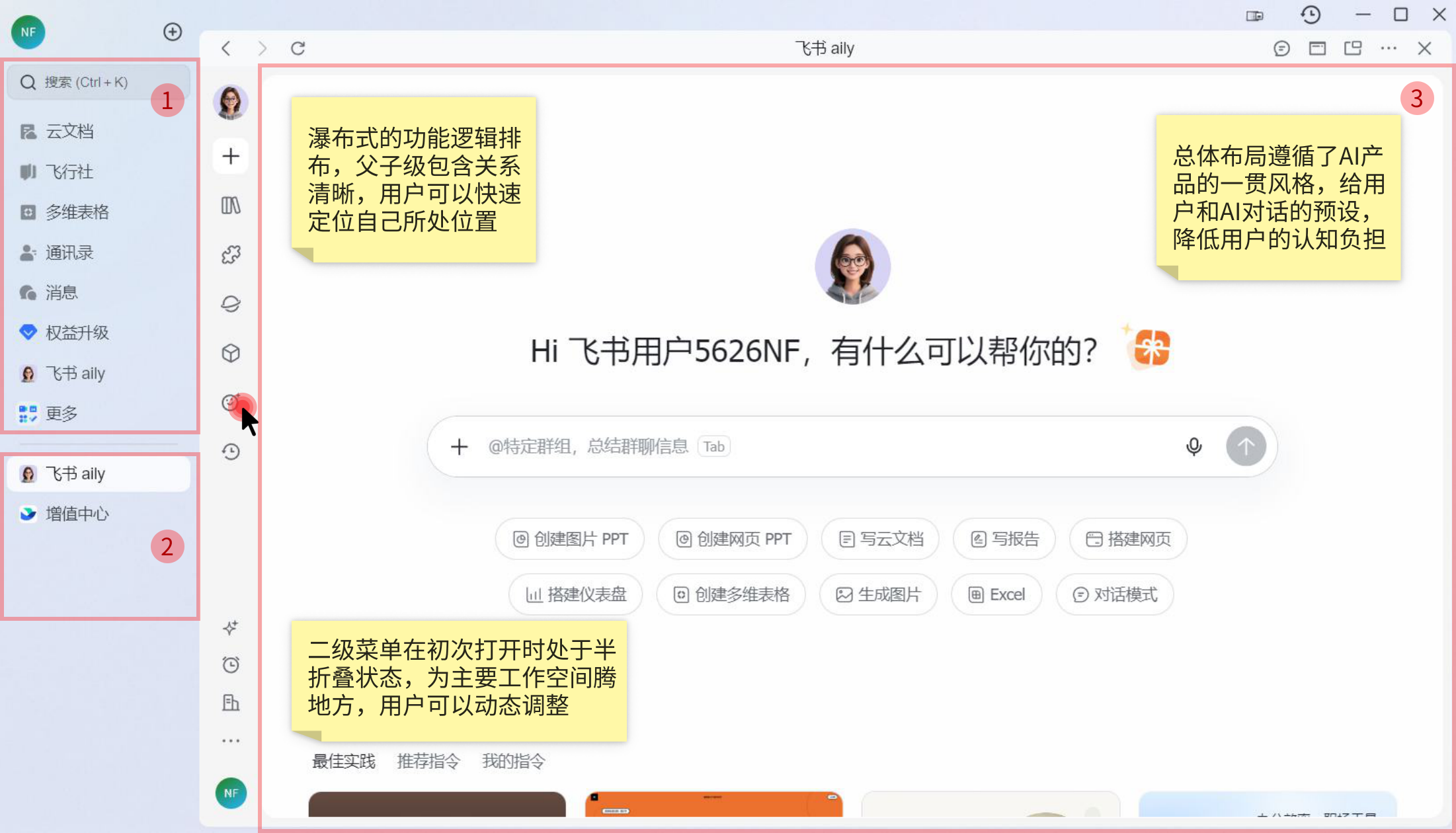
Feishu Aily workspace regional layout screenshot

Regional Layout

  1. Most feature entries are arranged in the upper-left list, with some features collapsed to create space for expanded lists below.
  2. The middle area works like a browser task bar, collecting the user's open task tabs and reducing repeated navigation into deep subpages.
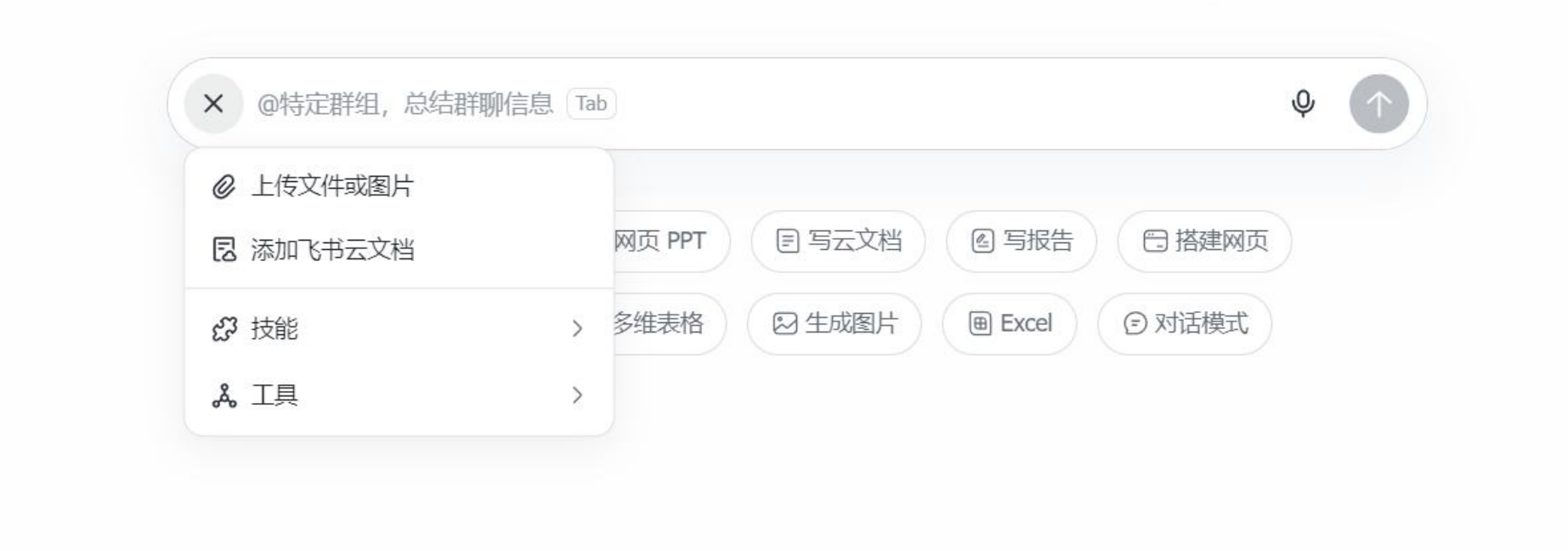
  3. The main AI workspace uses a horizontal layout with the input box, history, and recommendations. The input box supports multimodal input, including voice, images, and documents.
Feishu Aily attachment menu detail
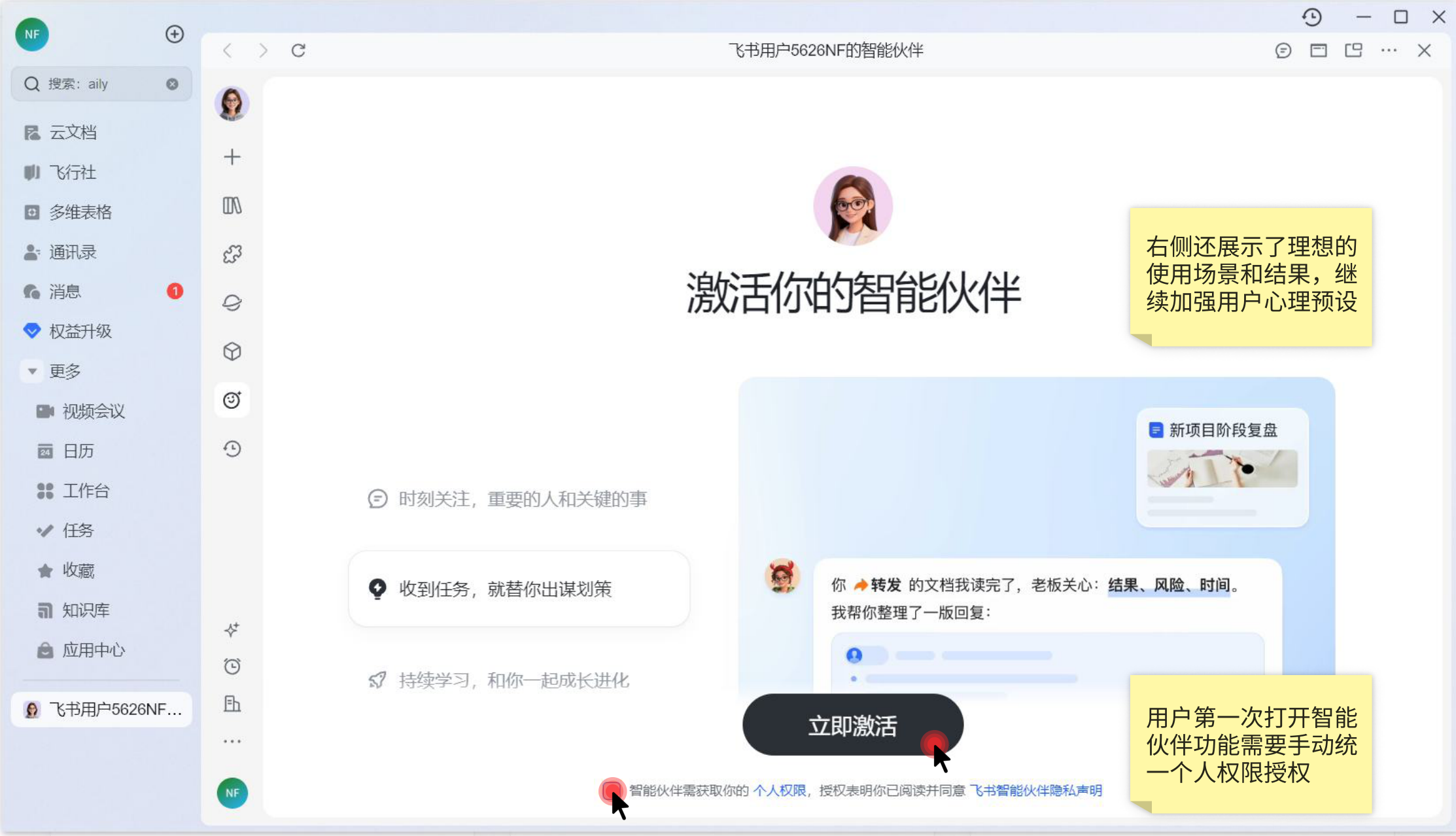
Feishu Aily intelligent partner activation and authorization screenshot

First-time activation and permission authorization

When users open the intelligent partner for the first time, they need to manually authorize personal permissions. The right side also presents ideal usage scenarios and results, reinforcing user expectations.

The first activation page is designed to make AI feel like a trustworthy work partner: first explain what it can do, then ask the user to confirm the permission boundary.

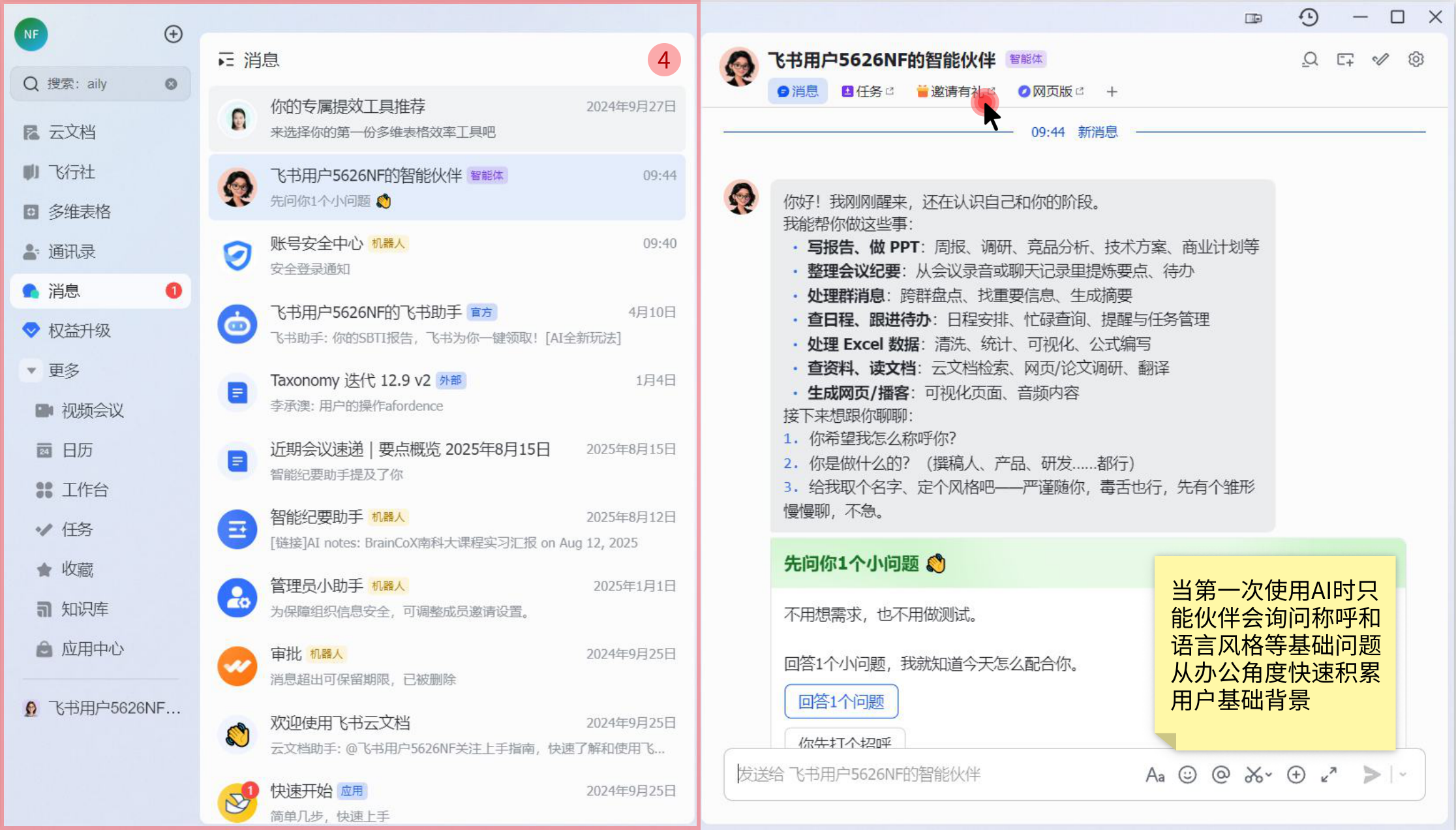
Feishu intelligent partner chat list and workflow entry screenshot

Feishu-style navigation and chat-list area

This reflects Feishu's entry strategy of productizing Aily as an "intelligent partner inside office workflows." By reusing the message list and global navigation, AI is placed inside the user's existing work path rather than becoming a separate isolated entry, increasing both touch frequency and scenario continuity.

When users use AI for the first time, the intelligent partner asks about the user's preferred name and language style, quickly building a basic work context from an office perspective.

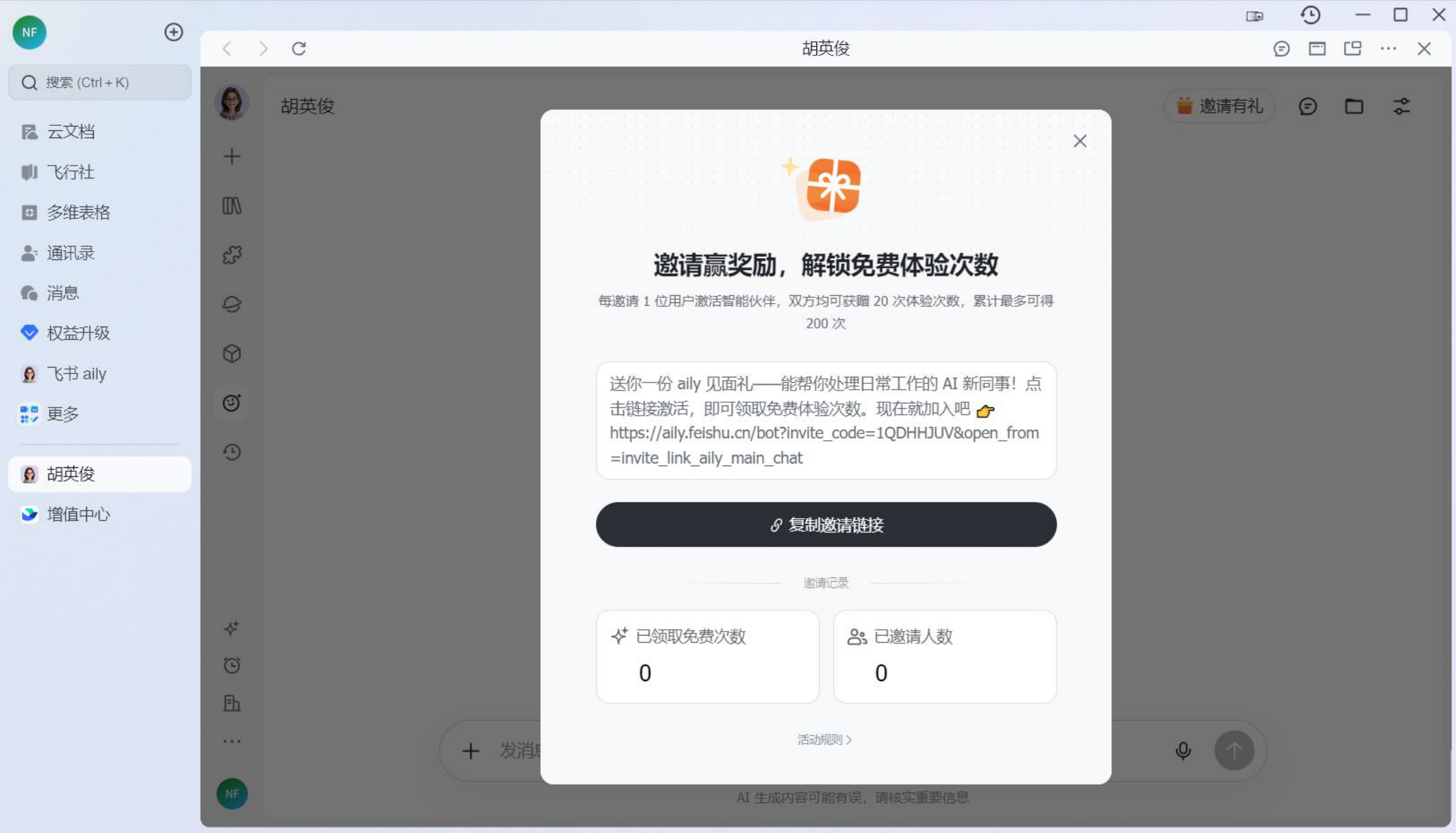
Feishu Aily invitation rewards and free usage quota screenshot

Pricing mode, free quota, and cost control

Aily does not directly expose token costs to users. Instead, it abstracts complex model calls, multimodal processing, and long-context cost into "experience credits." This lowers the understanding threshold for office users and makes free trials, invitation rewards, and paid-plan conversion easier for Feishu.

Considering that images, PPT, and similar tasks cost significantly more than ordinary text chat, Feishu uses the 20-credit reward to cover a relatively complete office AI experience, helping users perceive value in real workflows. The 200-credit cap helps control model-cost overflow, prevent misuse, and reserve space for later enterprise AI benefits, team plans, or usage packages.

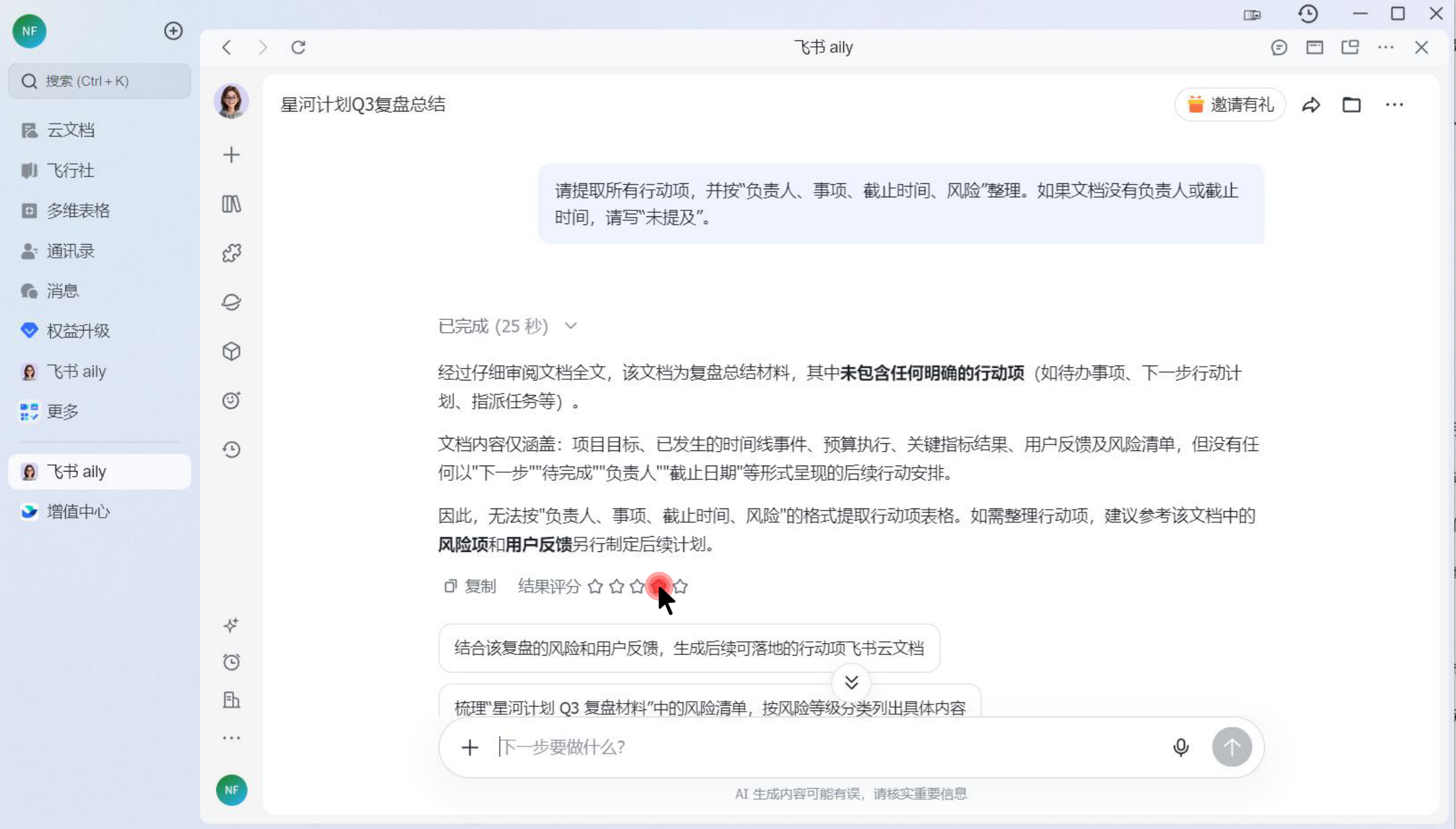
Feishu Aily follow-up question recommendation screenshot

Purpose and risk of follow-up question recommendations after a response

  1. Answer control: before the user enters the next prompt, the system checks whether it can reduce misuse probability.
  2. Task-flow progression: it naturally guides users from "information extraction" into follow-up tasks such as risk sorting.
  3. Context convergence: recommended questions stay around the review material, reducing off-topic prompts and AI hallucination spread.
  4. Product capability showcase: it guides users toward higher-level features such as PPT generation.
  5. Quota consumption and conversion: it accelerates free-query usage and points users toward purchase flow.

Risks: mainly AI-result risks and product risks from the recommendation mechanism itself

  1. False trust risk: follow-up recommendations improve task continuity, but may also lower user vigilance. If key information is missing, the document may still be pushed toward solution generation.
  2. Responsibility-boundary risk: in collaborative documents, AI-generated content can gain a status similar to "official record" once inserted into the document body. If the system does not distinguish AI suggestions, user-confirmed content, and original document facts, responsibility boundaries become blurred.
  3. Cognitive laziness risk: users may directly click recommended questions instead of actively judging what they really need to ask.

Why three follow-up questions?

It is essentially a balance between "proactive guidance" and "user control." Compared with a single recommendation, three questions cover three typical office follow-ups: understanding, action breakdown, and output generation. Compared with more recommendations, three keeps interface noise, misdirection, and cognitive load under control.

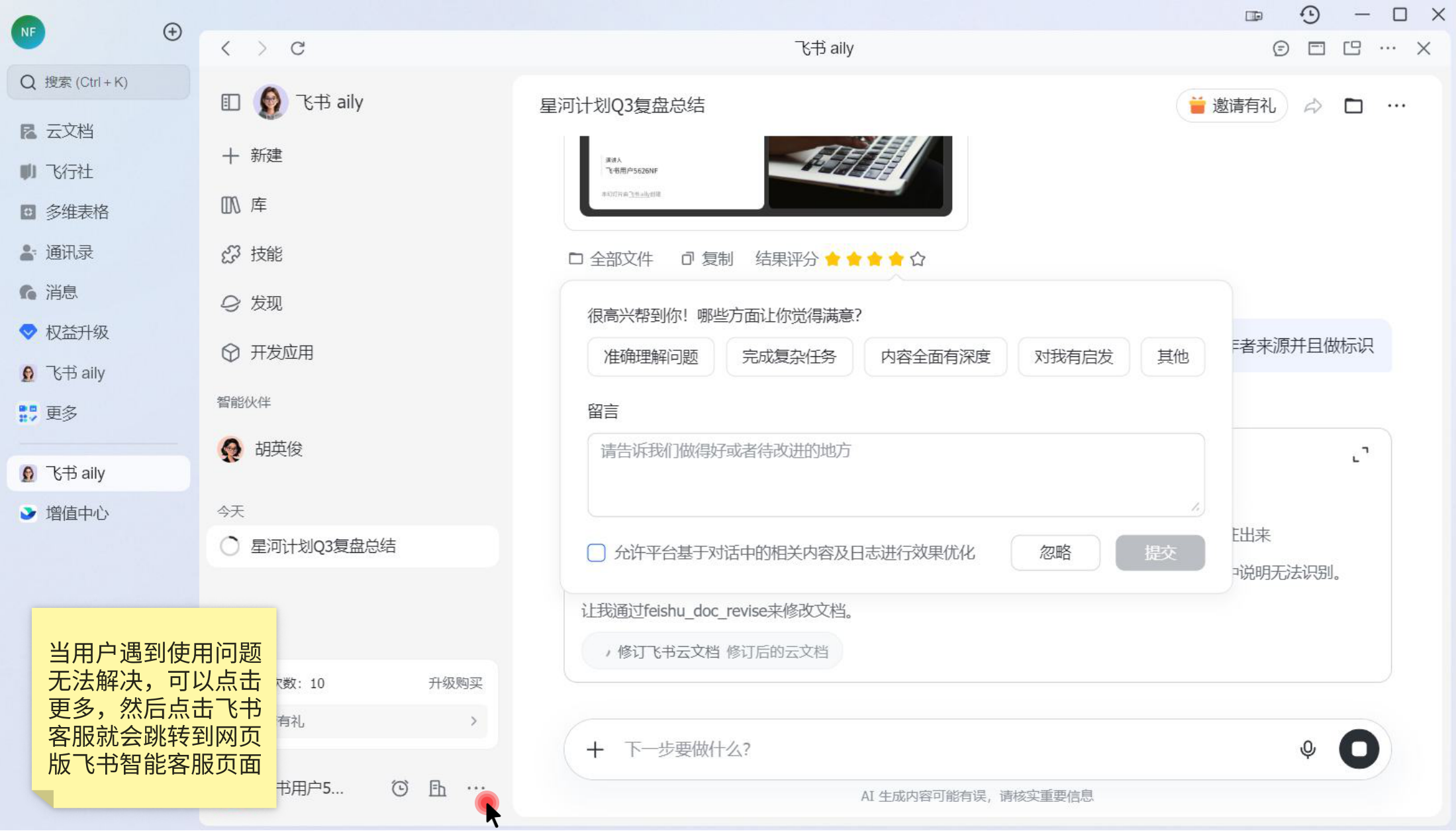
Feishu Aily result rating and feedback modal screenshot

After the answer: from satisfaction feedback to lightweight data-authorization loop

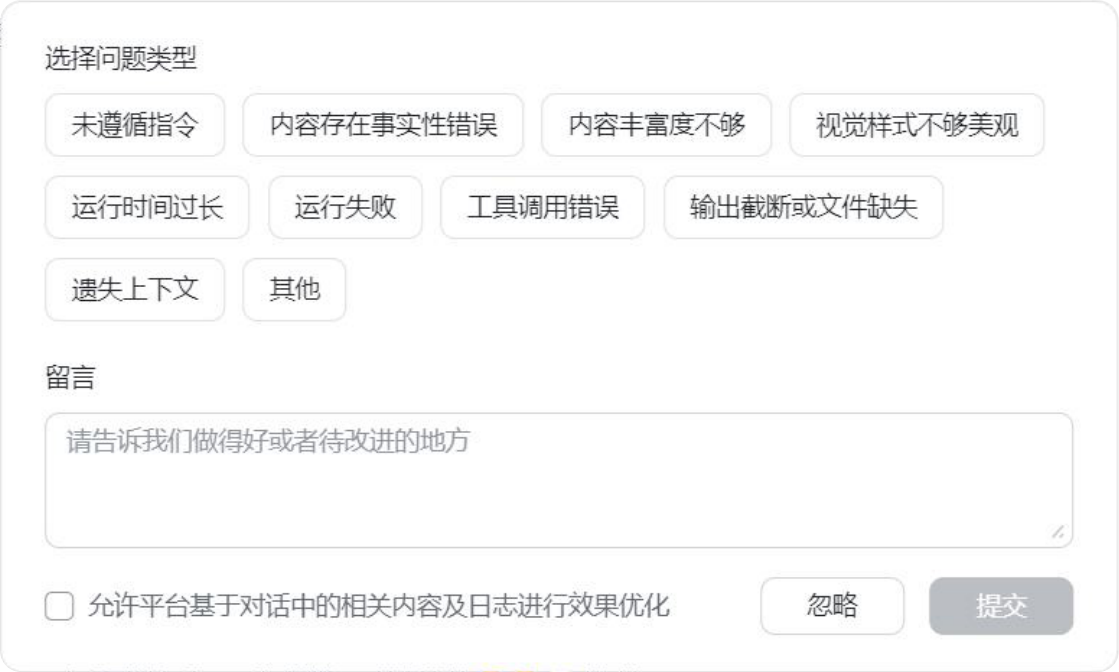
Feedback window shown when the rating is three stars or below

From the experience perspective, the design breaks AI evaluation away from a simple "good/bad" judgment and turns it into more specific task dimensions, such as whether AI understood the question accurately, completed a complex task, or provided enough depth. This structured feedback helps the platform continuously improve AI capability.

However, in enterprise office scenarios, the explanation of data authorization is not clear enough. Users need to know what content will be used, whether it can be withdrawn, and whether it may affect enterprise document security. For office AI, the feedback mechanism is not only a product-optimization tool, but also part of the trust mechanism.

05 / AI and Human Boundary

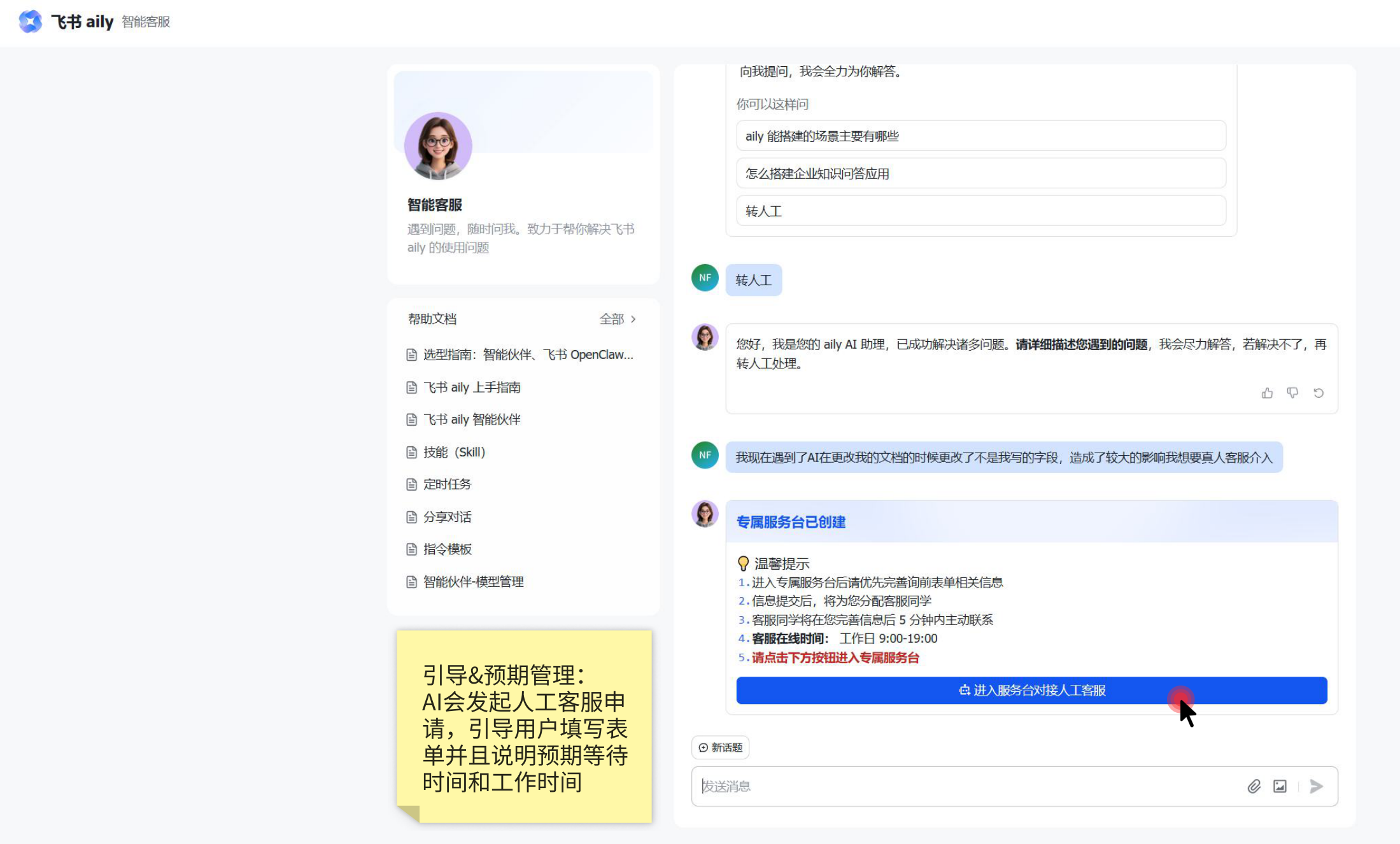
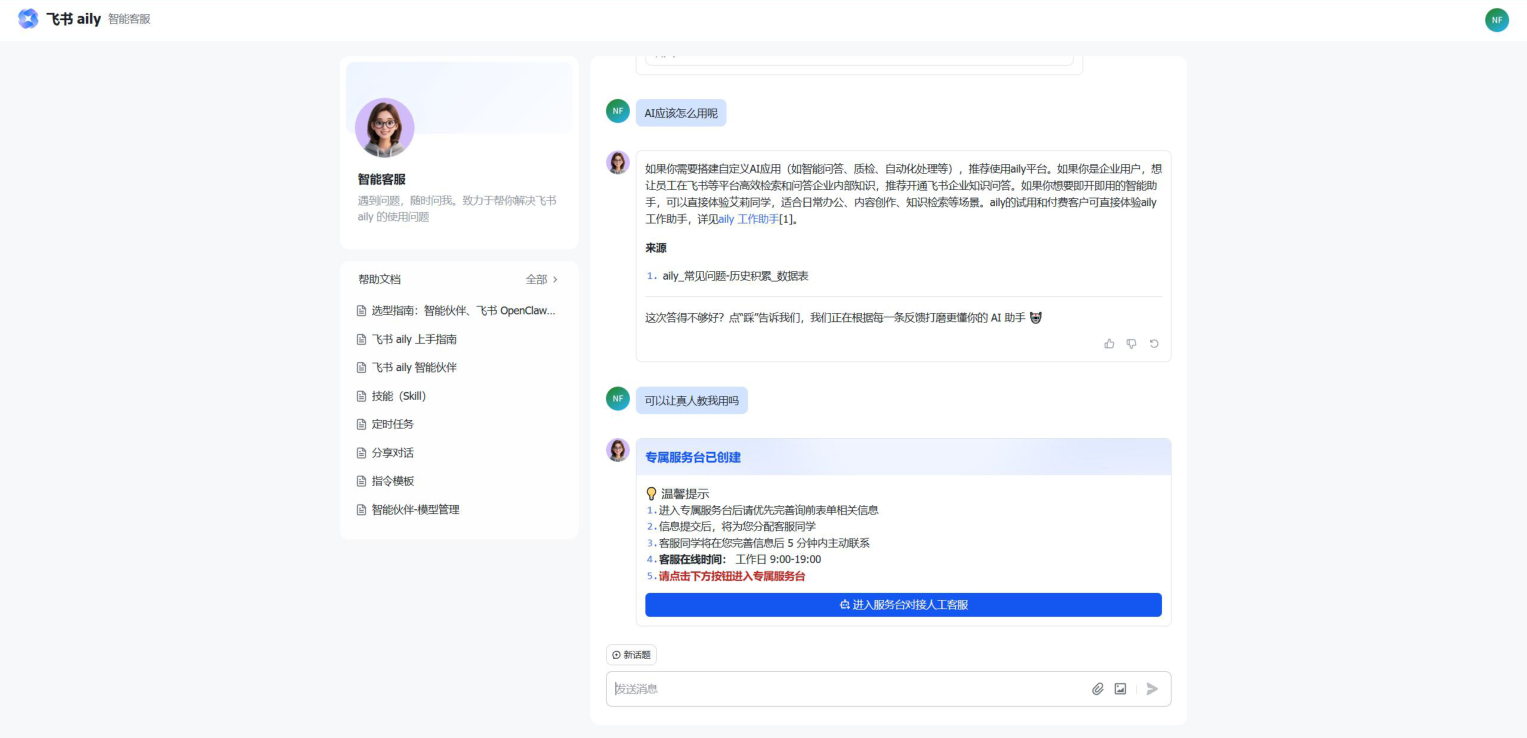
Feishu intelligent customer service handoff path

When a user's issue exceeds AI's capability boundary, the system does not immediately connect a human agent. Instead, it uses guidance, forms, and group-chat handoff to triage the request.

Feishu intelligent customer service human-handoff friction screenshot
Feishu intelligent customer service handoff detail screenshot

Friction before human handoff

Feishu helps human customer-service teams triage requests through help documents, AI-guided questioning, and targeted AI blocking. When a user only asks for a human agent without describing a clear issue, AI tries to intervene and solve the potential problem first. The customer-service AI also uses RAG-based knowledge from a large set of help documents and outputs them when appropriate.

Feishu customer-service pre-inquiry form screenshot

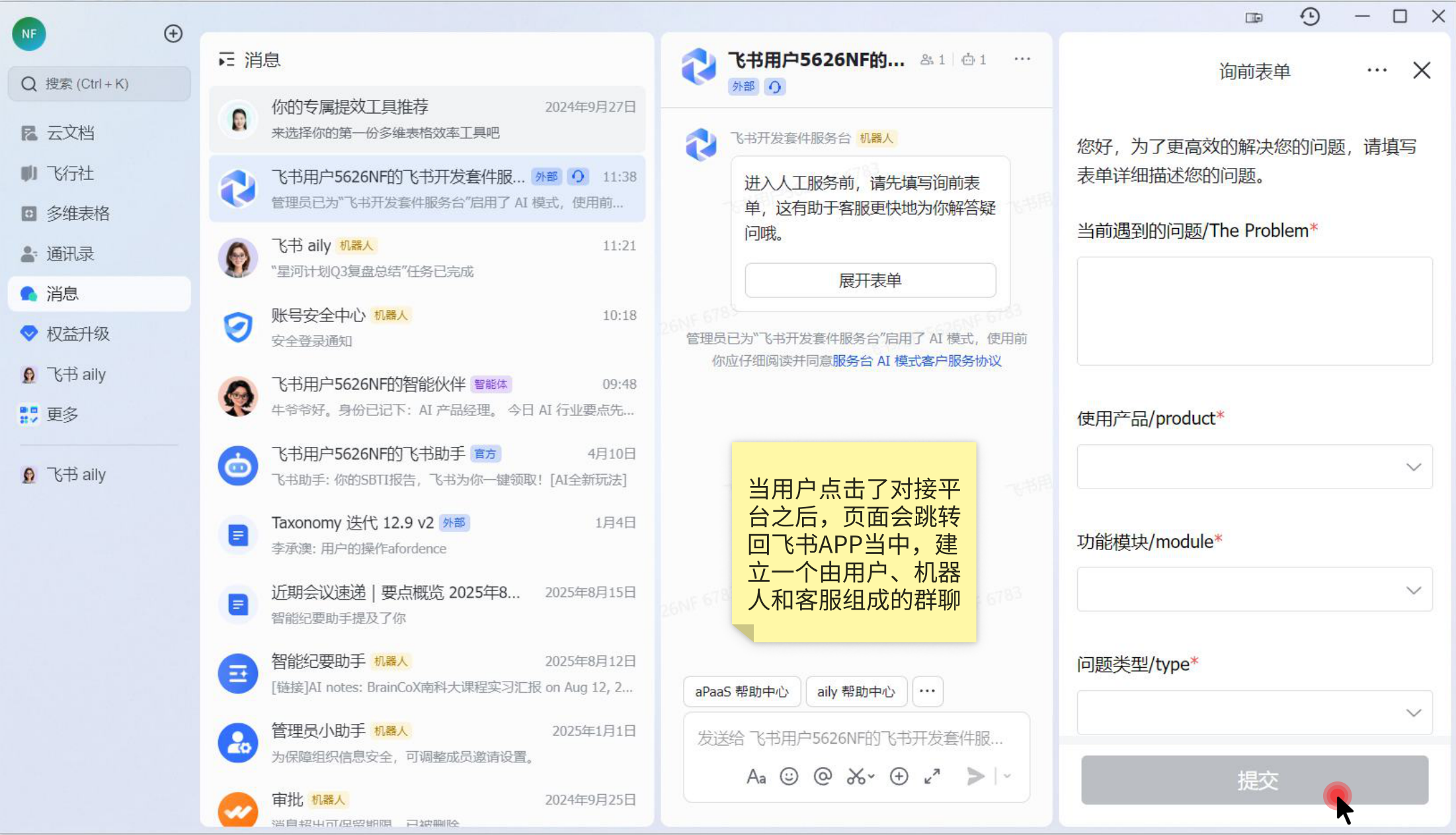
Risks in the pre-inquiry form

  1. The consultation form uses customer-service-system language, making it difficult for users to understand; users may not know which module their issue belongs to.
  2. Choosing the wrong module may lead to incorrect triage.
  3. Urgency is left to users, and users will often choose the most urgent option, making priority layering ineffective.
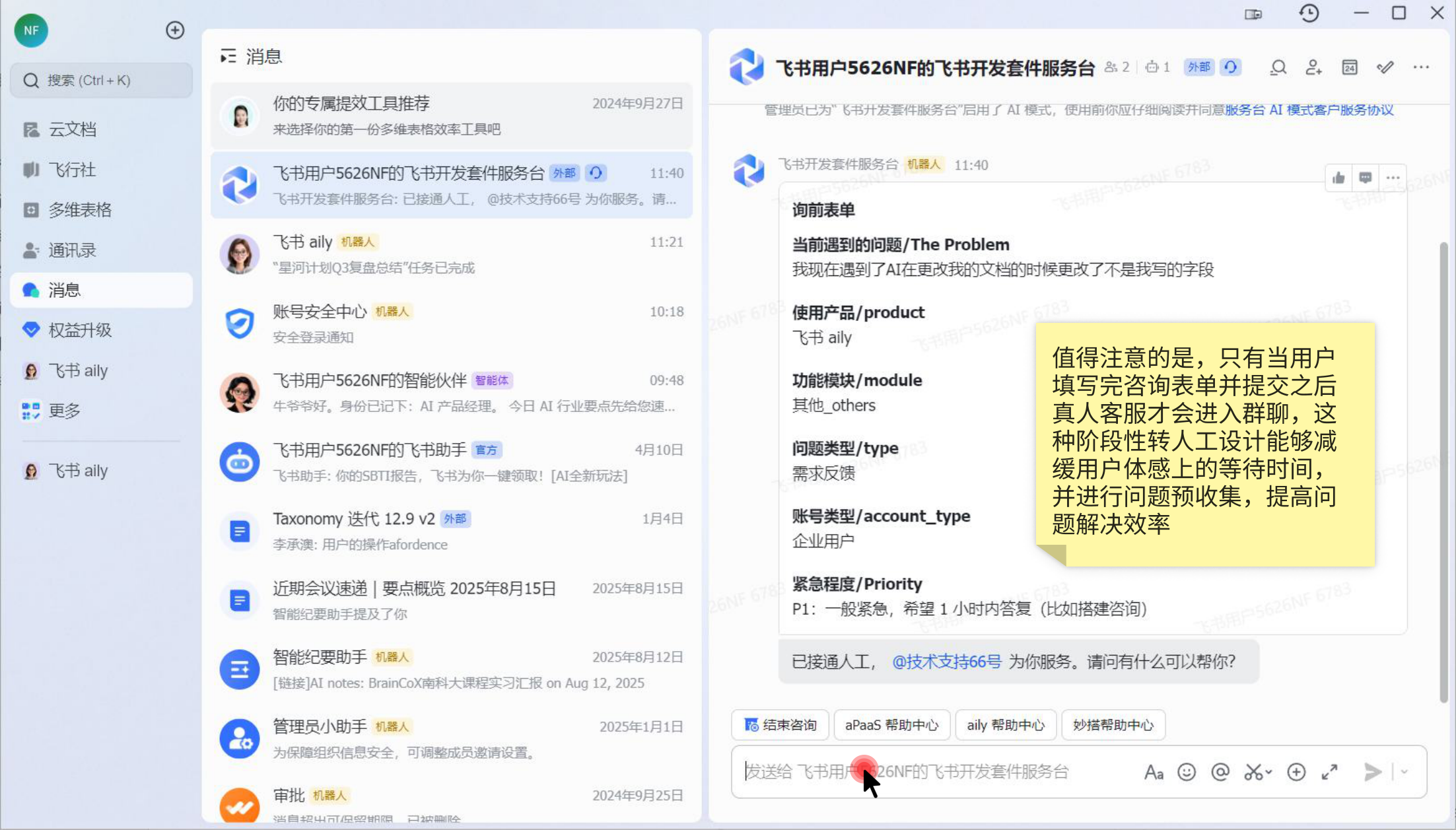
  4. The overall flow shifts from customer-service AI to a bot-plus-support group. The user's previous context with AI may be lost during this transition.
Feishu customer-service form submission leading to a group chat screenshot

Finding the balance between user needs and limited support resources

Customer service is also a limited platform resource. As user volume grows, more issues will inevitably require human intervention. The platform therefore needs to pre-judge, triage, pre-collect information, and help users self-resolve when possible.

Feishu uses help documents, AI-guided questioning, and targeted AI blocking to support human-service triage. When users only request a human agent without explaining the problem, AI attempts to intervene and solve potential issues. The support AI also relies on RAG-trained help documents and outputs them at suitable moments.

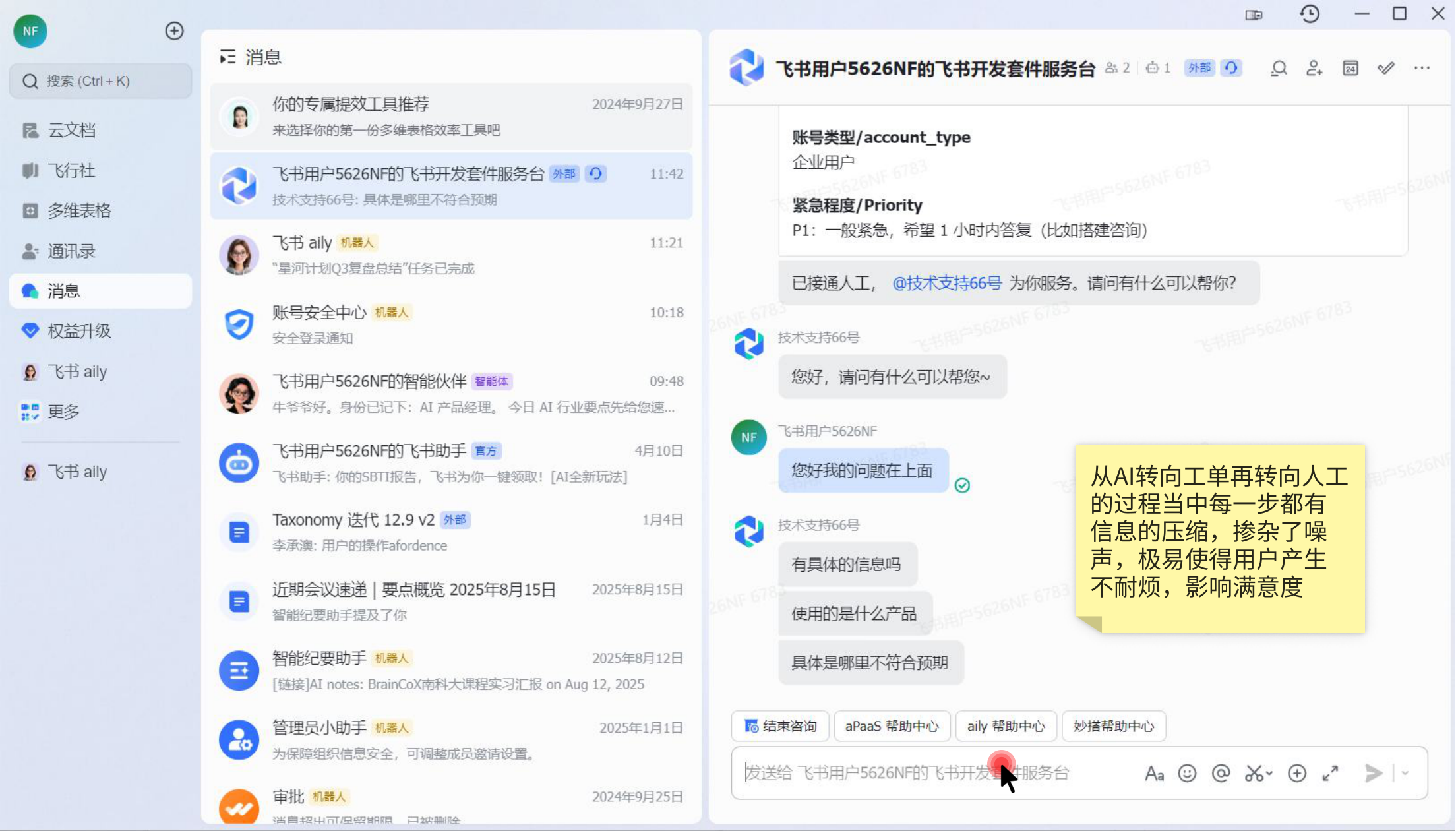
Feishu support follow-up questions after human handoff screenshot

Information compression from AI to ticket to human agent

When the flow moves from AI to a ticket and then to a human agent, every step compresses information and introduces noise. This easily makes users impatient and lowers satisfaction.

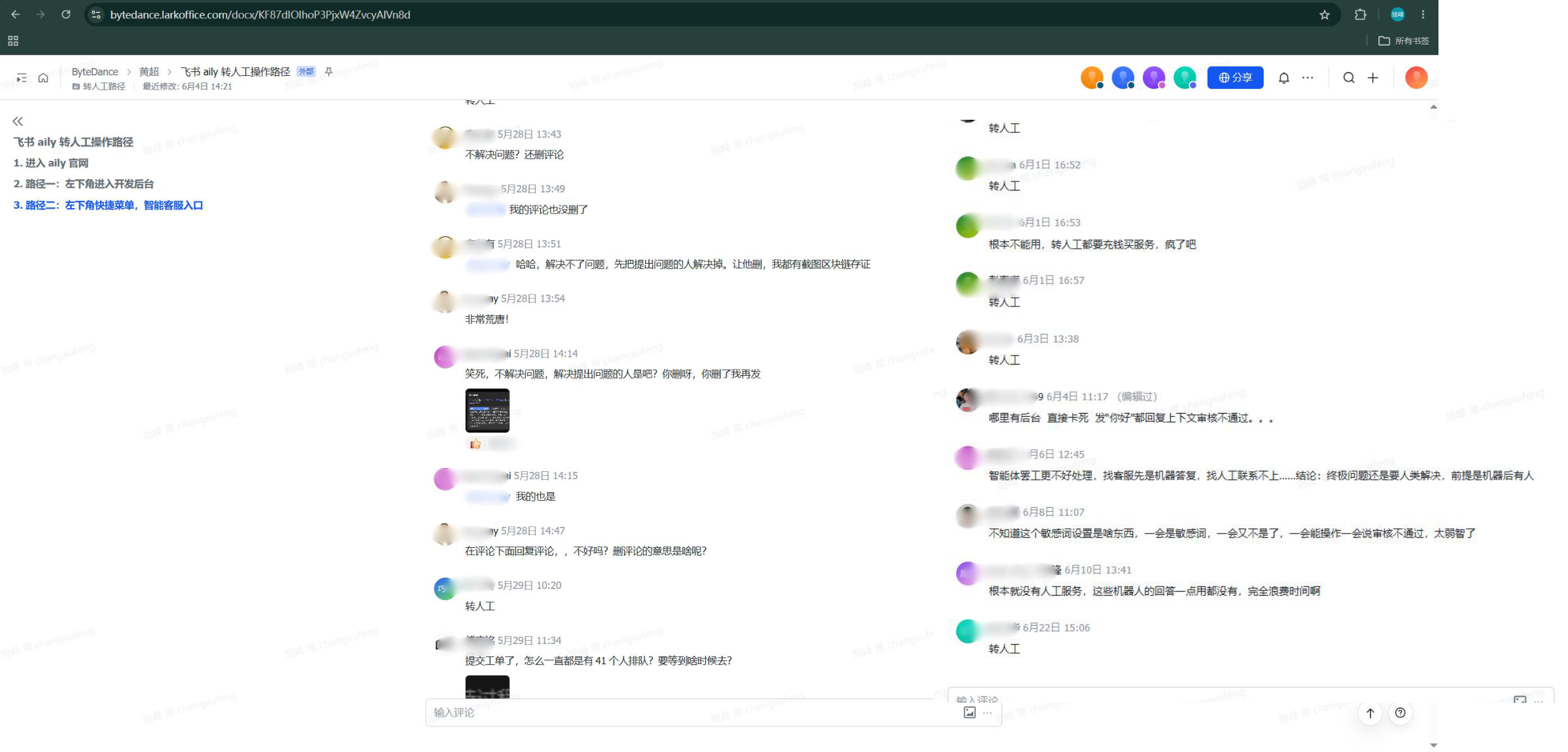
User comments about Feishu intelligent customer service handoff

From user comments: experience breakpoints in the handoff mechanism

In visible comments, user feedback clearly concentrates on "hard to reach a human agent", "the bot cannot solve the problem", "long queue time", and "the issue was not effectively carried over." It is important to note the sample bias here: users who go to customer service or comment areas are usually already in an unresolved or dissatisfied state, so these comments cannot represent overall user satisfaction. Still, they are valuable because they expose experience gaps in AI support's failure recovery, human accessibility, and emotional reassurance.

AI and Human Boundary: Feishu intelligent customer service handoff logic

06 / Prototype

AI-to-human handoff improvement prototype

This interactive prototype demonstrates an optimized path from AI customer service to human-agent handoff, focusing on issue pre-collection, context carryover, and lightweight friction before human intervention.

Interactive micro-demo: click through the prototype to experience the full path from AI troubleshooting to human support.

07 / Future Experience Review

Proposal highlights: improving AI and human support collaboration

Based on the handoff path and interactive prototype above, the solution goal is to let AI organize context, collect key information, and hand a more complete issue state to human support before failure becomes a dead end.

  • Same-context collaboration: Place the user, AI support, and human support in the same conversation. After human support joins, they can directly see AI's previous judgment, the user's original description, and structured issue information, reducing repeated explanations and information loss through retelling.
  • AI organizes first, humans take over later: Before the user enters human support, AI first provides troubleshooting suggestions based on the conversation. If the user still needs human help, AI automatically generates an issue-confirmation form, and the user only confirms or adds key information instead of filling a traditional ticket from scratch.
  • User-oriented expression: Replace backend classification language with user-friendly fields, such as "What result did you expect?", "What actually happened?", and "What is the impact scope?", lowering comprehension cost.
  • Lightweight friction for better handoff quality: Required marks, disabled submit states, and an information-confirmation form create a clear threshold before human support. Compared with a simple "contact human" button, this can reduce low-information requests and improve support efficiency.
  • Fewer repeated questions: Form information becomes a visible issue summary after human support joins, helping support staff quickly judge priority, impact scope, and handling direction.

08 / Closing Reflection

Observations and thoughts

From Feishu Aily and DingTalk Wukong to Salesforce's Dreamforce push around Agentforce and Slack as a collaboration entry, office AI competition is no longer just about implementing a single feature. It is a contest over who can become the first AI entry point for enterprises. Each platform is using its collaboration ecosystem to claim that position: Feishu emphasizes documents, knowledge, and intelligent partners; DingTalk emphasizes an enterprise AI work platform; model companies such as Kimi are also exploring future AI forms through documents, spreadsheets, slides, agents, and related capabilities.

However, office agents are still in an early explosive stage. The real challenge is not only whether the model can answer. It is whether the product can complete long-chain tasks reliably, understand enterprise context, and handle permissions, data boundaries, and recovery after failure. Enterprise collaboration platforms naturally own internal files, messages, organizational relationships, and permission systems, which gives them a stronger moat than general-purpose model products. But once external files, cross-system data, and sensitive operations are involved, privacy, compliance, and trust remain difficult.

Human intervention should not be seen only as "customer-service fallback when AI cannot answer." When users express extreme statements, or when issues involve minors, elderly people, illegal activity, self-harm risks, or other high-risk scenarios, products should treat human intervention as a safety triage mechanism: AI first identifies risk, reduces misjudgment and spread, then hands the parts that require judgment, reassurance, or action to humans. This mechanism essentially adds compliance, responsibility, and emotional support boundaries beyond model capability.

Therefore, I believe the current key to office AI is not just improving model capability. Product design must clearly define user control, permission boundaries, failure fallback, and trust mechanisms. Only when users know what AI can do, what it cannot do, how to recover when it is wrong, and when a human will take over, will enterprises be more likely to accept and pay for these products. This is also the core issue I focused on in this Feishu Aily teardown.

01

The core of office AI is not a chat entry, but a workflow entry

The real opportunity is to embed AI into documents, messages, spreadsheets, and collaboration chains, rather than asking users to open another chatbot.

02

AI failure is inevitable; the key is preserving control after failure

When model output is unreliable, the product should provide explanation, feedback, undo, human escalation, and context carryover so users know what they can do next.

03

Permissions, feedback, and human fallback are part of enterprise AI trust

Enterprise users care not only about efficiency, but also about whether data is used, who can see it, who is responsible for outcomes, and whether humans can intervene in high-risk situations.

04

Good Agent products design model capability, user expectations, and human boundaries together

Model capability determines the ceiling, user expectations determine acceptance, and human boundaries determine whether the experience can survive failure.